
Independent Seniors apps · Health Record
Set it up once. Then each week starts with one button.
Your medicines, vital signs, doctors and emergency details in one large-print record. No paper forms to write out each week: tick each dose as you take it, see at a glance what’s overdue today, and print a copy for the fridge whenever you like. Everything stays on your own device.
Kept on your device · No tracking, ever · Large print · Works offline once activated
Easier than paper, every single week
The Health Record does the writing out for you, so your week is spent ticking, not copying.
Set up once
Type each medicine, its times and doses once, or have your carer do it for you. Everything carries forward, week after week.
A new week is one button
Press Start New Week, then Yes. The ticks clear, the date moves on and the finished week is saved. Nothing to fill in, nothing to copy out.
Overdue doses stand out
Any dose whose time has passed without a tick turns amber, so a missed tablet is noticed the same day, while there’s still time to ask your pharmacist or doctor what to do.
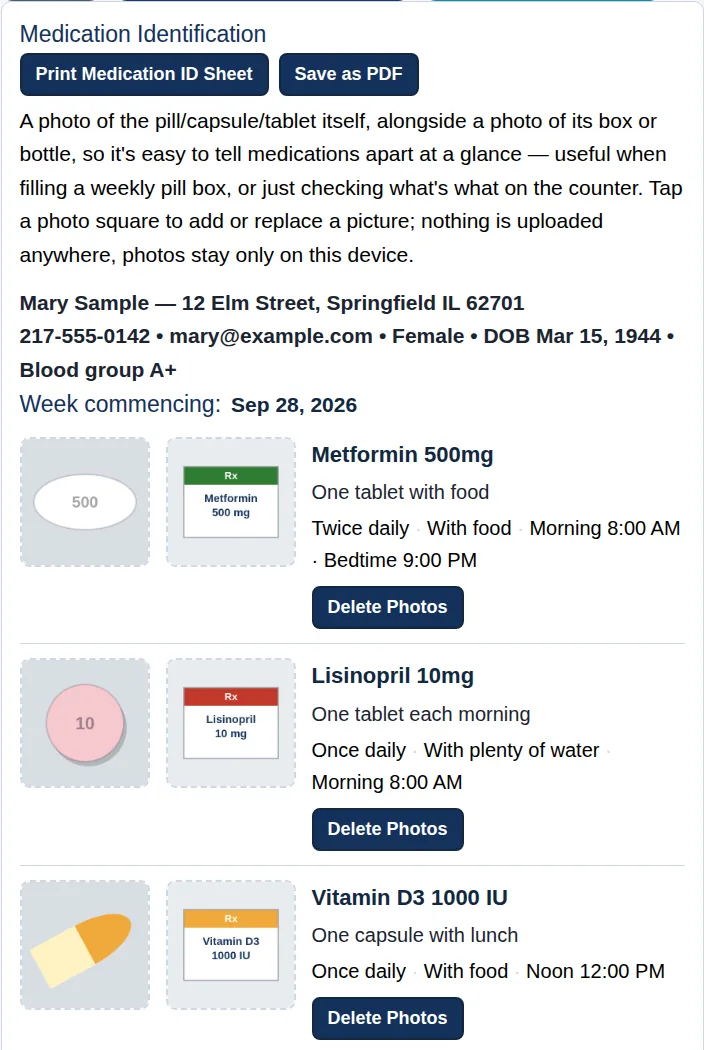
Tell your pills apart
A photo of each pill beside its box, and a colour for each day to match your pill box, make filling it quicker and more accurate.
One plan, every copy agrees
The fridge sheet, the pill-box sheet and your doctor’s copy all print from the same plan, so there’s no copying by hand and no copies that disagree.
On screen or on paper
Use it on your computer, tablet or phone, or print your plan, this week’s log and your readings sheet for the fridge door.
Your carer kept in the loop
Once a week, one locked Carer Report of your doses, readings and notes, sent from your own email.
Ready in an emergency
WHO TO CALL IN EMERGENCY is on every page, even after a licence ends. Print an Emergency Sheet and a Wallet Card.
Speak instead of typing
Tap the microphone beside a medicine, your details or a note and say it, on devices that support dictation.
Three parts, one record
Choose the parts you need. Your details and emergency information come with every edition.
-
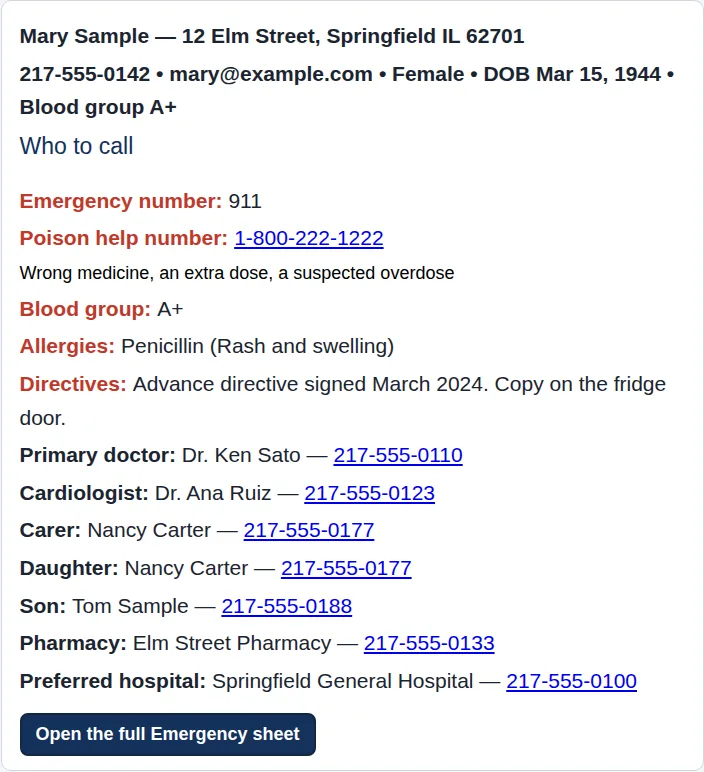
Who to call: one press, on every page. (Fictional example.) Your details and emergency information
You, your carer, your doctors and pharmacy, your health history, and the two red buttons on every page: WHO TO CALL IN EMERGENCY and EMERGENCY MEDICAL INFO.
-
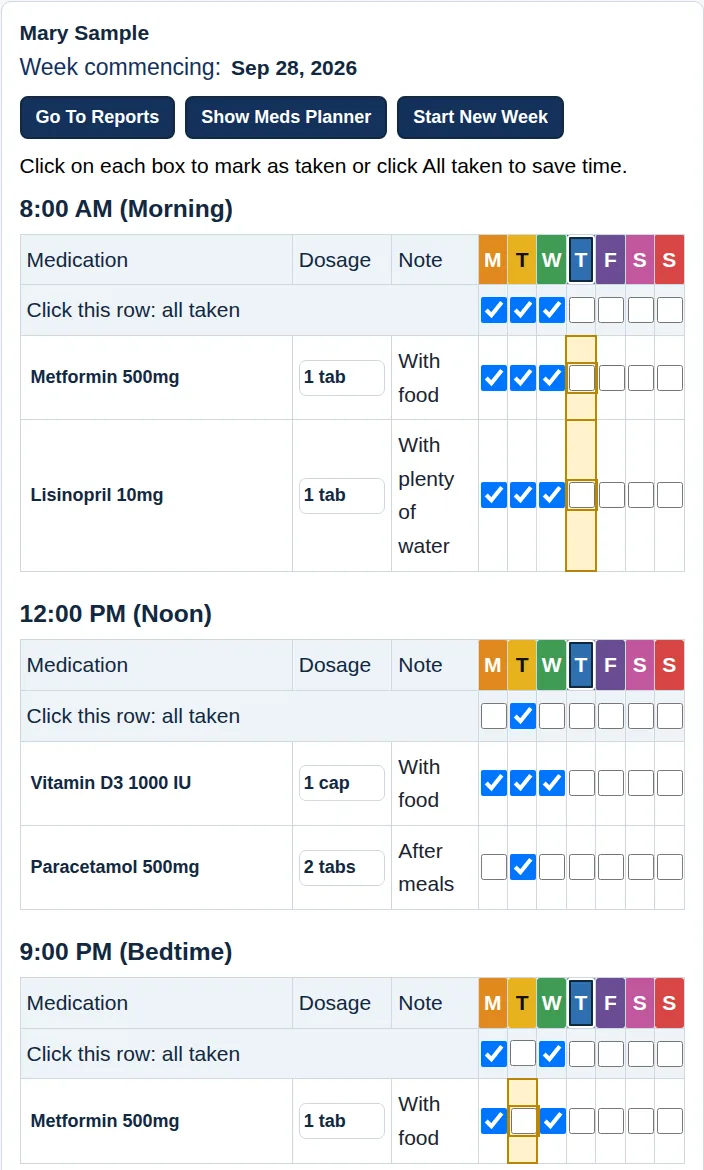
The Daily Log: amber shows what’s overdue. (Fictional example.) Medications
Medicines, vitamins and supplements, set up once. Fill your pill box from photos, tick each dose, see what’s overdue today, and print your plan for the fridge.
-
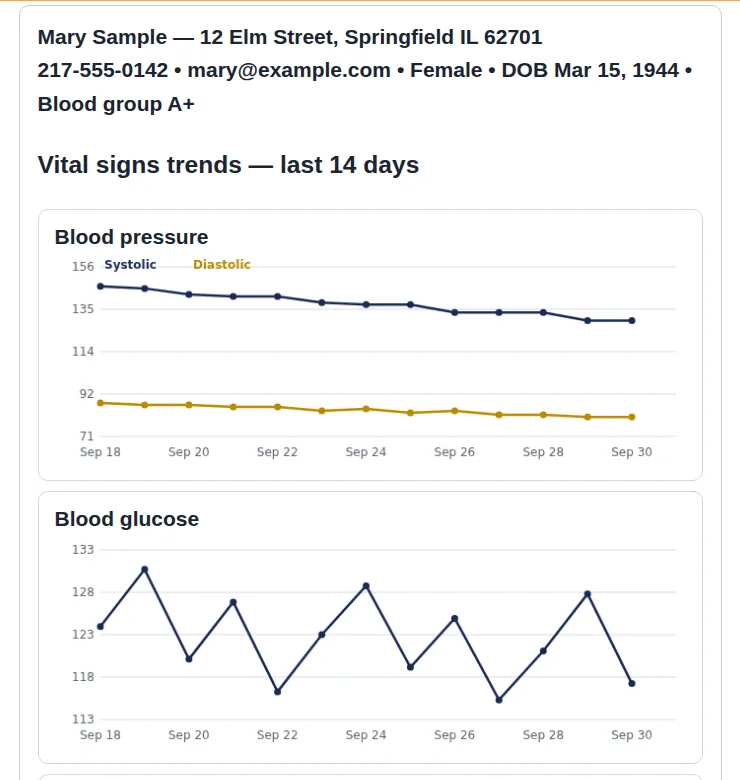
Trend charts for the last 14 days. (Fictional example.) Vital signs
Blood pressure, glucose, weight and other checks, planned once with your doctor’s instructions. Record each reading as it’s due, and see the trend.
Your week, in five steps
Set up once. After that, each day takes a minute or two.
Set up once
Your details, your medicines and your checks. Or your carer sets it all up and sends it to you to open with one press.
Fill your pill box
Match each pill to its photo, and each compartment to its day’s colour.
Each day, tick and record
Tick each dose as you take it and record any reading that’s due. Today’s column is outlined; anything overdue is amber.
Write a note when something happens
How you’re feeling, a side effect, a question for your doctor. The date and time are added for you.
End of the week: two presses
Carer Report if you have a carer, then Start New Week. The finished week is saved as your WEEKLY BACKUP.
Your information stays with you
- Saved as you go.
Your entries are kept automatically in the browser you use, on your device. Nothing you type leaves your device unless you send it.
- Backups you keep.
Press Backup to save a copy in your Downloads folder. Each Start New Week also saves a WEEKLY BACKUP of the finished week.
- Locked with your passkey phrase.
Every file that leaves your device is locked with a phrase only you know. We never see it and can’t reset it.
- Online once.
You need the internet to activate the first time. After that, everyday use works offline.
No tracking, ever. The apps contain no analytics, advertising or tracking code, and no third-party software that could report what you type. We never receive your health information, so it can’t be lost, sold or shown to advertisers.
Free with every licence: 6 printable companions
Interactive checklists and guides to fill in on screen, save and print, sent with your Health Record licence. Each comes in a standard and a dyslexia-friendly edition.
- Family Emergency Contact Tree. Every emergency contact in one place, ready to print and share with the family.
- Fall Prevention Checklist. Simple changes that lower the risk of a fall.
- Fall-Risk Self-Check. A quick check of the most common fall risks, at home and in your daily routine.
- ICE Wallet Card. An “in case of emergency” card to fill in, print and carry.
- First Aid Guide. Plain-English first steps for common emergencies at home.
- Emergency Kit Checklist. What to gather before an emergency, and what to do when one comes.
Try it free for 30 days
Your free trial includes everything, so you can try every part before you choose. Then pick the edition that fits, by the month or the year.
Medications
$2 a month
or $9.95 a year
Plan your medicines, vitamins and supplements, fill your pill box from photos, tick each dose and print your plan for the fridge.
Vital Signs
$2 a month
or $9.95 a year
Plan your checks, such as blood pressure, glucose and weight, record each reading, and print trend charts and your monitoring plan.
Medications & Vital Signs
$3 a month
or $14.95 a year
Everything in both, in one record. One Carer Report covers your doses, readings and notes. Best value.
Every edition includes your details, Who to call, your health history, Emergency Medical Info with the Emergency Sheet and Wallet Card, backups, the dyslexia-friendly edition and the step-by-step User Guide. Plus 6 free printable companions, from a Family Emergency Contact Tree to an ICE Wallet Card: see the list.
Prices in US dollars. Any tax is shown at checkout before you pay. Licences never renew by themselves: the app reminds you before yours ends. Paid licences have the same 30-day money-back guarantee as our books: see our Refund Policy.
Clear about what it is
It does
- Keep your medicine plan, daily doses, readings and notes in one large-print record
- Show today’s overdue doses in amber, on screen
- Print plans, weekly logs, readings, trend charts, history reports, an Emergency Sheet and a Wallet Card
- Save automatically in your browser, and save backup files when you ask
- Prepare a locked weekly report for your carer, if you have one
It does not
- Sound alarms or send reminders: you open it and look
- Check medicines against each other, or suggest doses
- Diagnose, rate your health, or tell you what to do about a reading
- Connect to your doctor, pharmacy, hospital or insurer
- Replace advice from your doctor, nurse or pharmacist
Questions people ask
Which edition should I choose?
Try everything free for 30 days first. If you only take medicines, choose Medications. If you only need to check readings such as blood pressure, choose Vital Signs. If you do both, Medications & Vital Signs keeps them in one record and one weekly Carer Report, for a dollar more a month.
Can my carer set it up for me?
Yes. The Carer Workbench includes a carer version of the Health Record. Your carer enters your medicines and details on their own computer and sends you a locked copy. You save the attachment and press Restore; it’s ready to use.
Is my information sent anywhere?
No. Your record stays in your browser on your device. The only things that leave it are files you choose to send, locked with your passkey phrase, and the letters you type in the medicine-name box, which are matched against the U.S. National Library of Medicine’s public list while you are online. See our Privacy Policy.
Will it work without the internet?
Yes, once it’s activated. You need a connection to activate the first time on each device, and for the medicine-name suggestions and the online guides.
Can I use it on my phone or tablet?
Yes. It works in the web browser on a computer, tablet or phone. Printing is easiest from a computer.
What happens when my licence ends?
The app reminds you beforehand. After it ends you can enter a new code, print your history reports and use WHO TO CALL IN EMERGENCY. Your records stay on your device.
Is this medical advice?
No. The Health Record records what you enter and prints it. For advice about your health or medicines, talk with your doctor, pharmacist or nurse.
The apps store what you type and print it the way you ask. They are not medical devices, not medical, legal or financial advice, and not a substitute for your doctor, pharmacist or care team. If someone needs urgent help, call your local emergency number.
Your week, in one place
Try every part of the Health Record free for 30 days.