
Independent Seniors apps · Carer Workbench
Know how their week went, without phoning round
The people you look after send you a weekly report from their Health Record. The Carer Workbench opens it, checks it, adds the week to their record, and shows you what needs attention first: a missed critical medicine, a reading outside the range you set, a note to read. No paper charts to collect, no accounts or logins for anyone.
Your Carer Workbench purchase includes a special carer version of the Health Record app.
Set up their record for them · Alerts on your ranges · Originals kept · Locked on your device
Built for the person holding it all together
Family carers
Looking after a parent, perhaps with a brother, sister or paid carer helping. One place for their reports, and one list of what’s open.
Independent carers
Several clients, each with their own record, medicines, readings and ranges, and one queue for all of them.
Small care teams
Management reports with counts beside every rate, printable or saved as PDF, and a CSV bundle for spreadsheets.
Why carers use it
Less chasing, less copying, and the important things first.
Set up their record for them
The carer version of the Health Record comes with your purchase. Enter their medicines, checks and details on your own computer and send them a locked copy to open with one press.
Their week comes to you
Each week they send one locked file from their own email. No accounts, no logins and nothing extra to install for either of you.
Missed critical medicines first
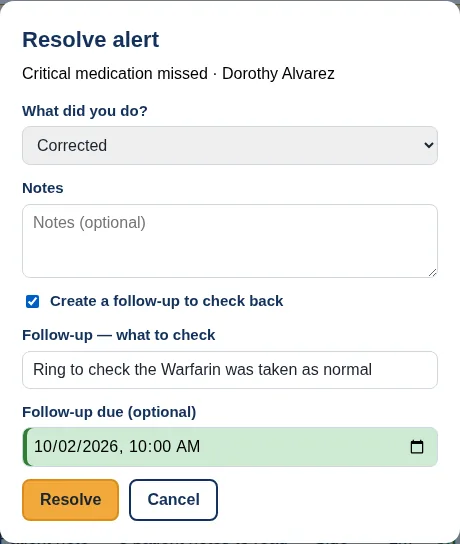
Mark the medicines that matter most for each person. A missed dose of one raises a Critical alert at the top of your queue.
Readings outside your ranges
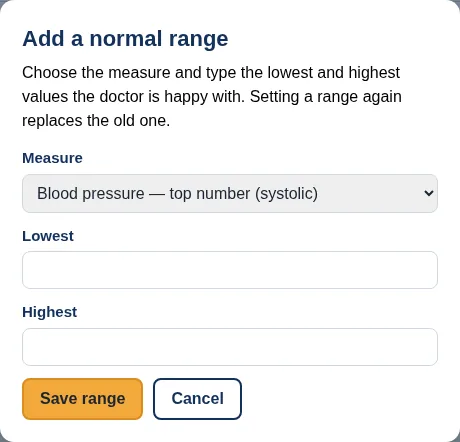
Set the range their doctor gave you, such as a blood pressure target, and readings outside it are flagged.
Every note in one place
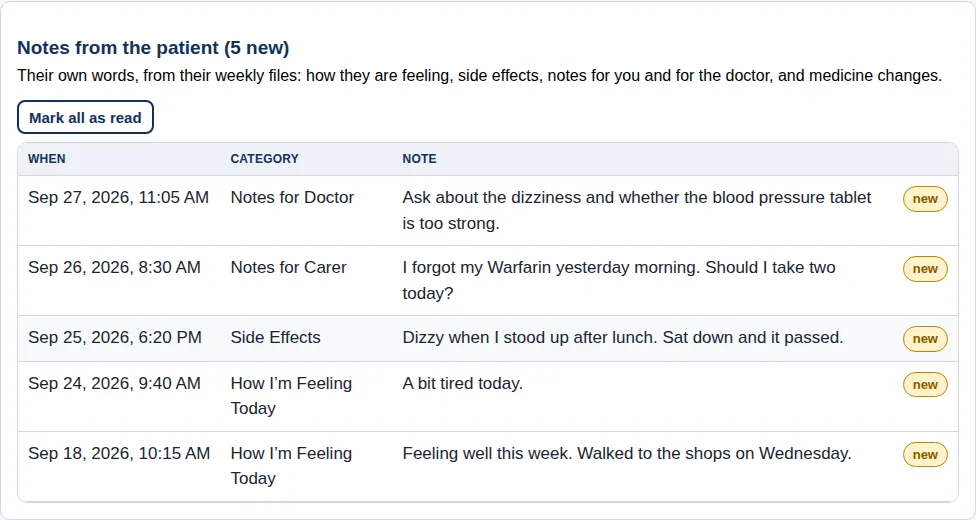
How they’re feeling, side effects, notes for you and questions for the doctor, by person and by date.
Nothing slips
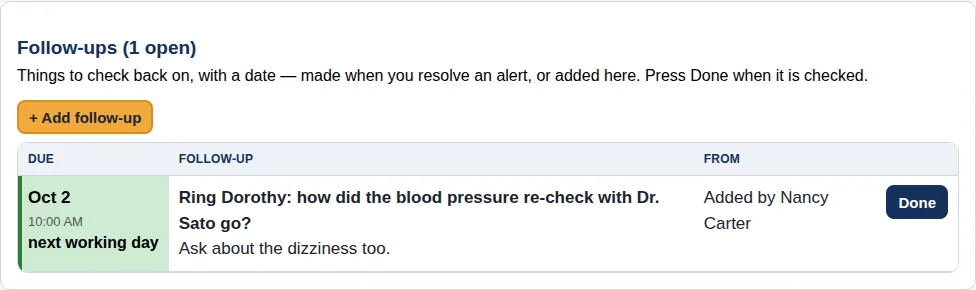
Follow-ups with due dates, and each person’s next call, visit and review, on one register.
One press per report
Validate, then process: the whole week goes into their record and a receipt shows what went in.
Practise first
Load demo data adds five fictional people with reports and alerts, so you can learn before your first real week.
Included with your Carer Workbench licence
The carer version of the Health Record
Your licence includes the Health Record Carer Edition: the full Health Record (medicines, vital signs, details and emergency information) with carer tools switched on. Every page says Carer Mode, so you always know which copy you’re in.
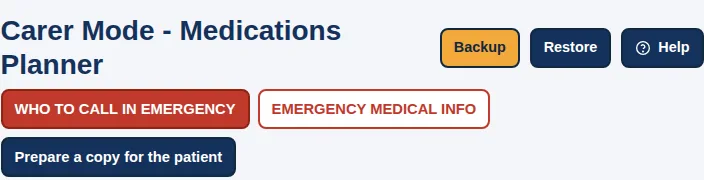
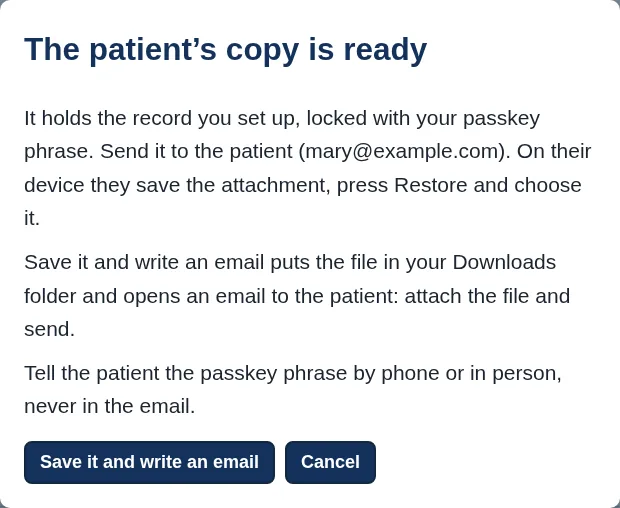
- Set up their record for them. Enter their details, doctors, medicines, times, doses and checks on your own computer. Press Prepare a copy for the patient: the copy is locked with your shared passkey phrase and an email to them opens. They save the attachment and press Restore, and their record is ready to tick. When a medicine changes, update it and send a new copy.
- See their full record. When they press Backup and send you the file, open it in your carer version with Restore and the phrase you share: their details, medicines, every tick, reading and note, as they see it.
- Help on a visit. On their computer, the Carer Edition and their own Health Record work on the same record, each with its own licence. What you change during a visit is there for them afterwards.
- Print what’s needed. Their medication plan, the fridge sheet, the Emergency Sheet, the Wallet Card or a History Report for an appointment.
The Workbench gives you the week at a glance and the alerts. The carer version gives you the whole record, to set up, check and print.
How a week works
Reports are shared deliberately, once a week. The Workbench is not a live feed.
They record
The person you look after ticks doses, records readings and writes notes in their own Health Record, on their own device.
They send you a locked file
Their Health Record prepares a protected Carer Report (a file ending .scj) and opens an email addressed to you. They attach it and press Send. Their passkey phrase reaches you separately, in person or by phone.
You import and validate
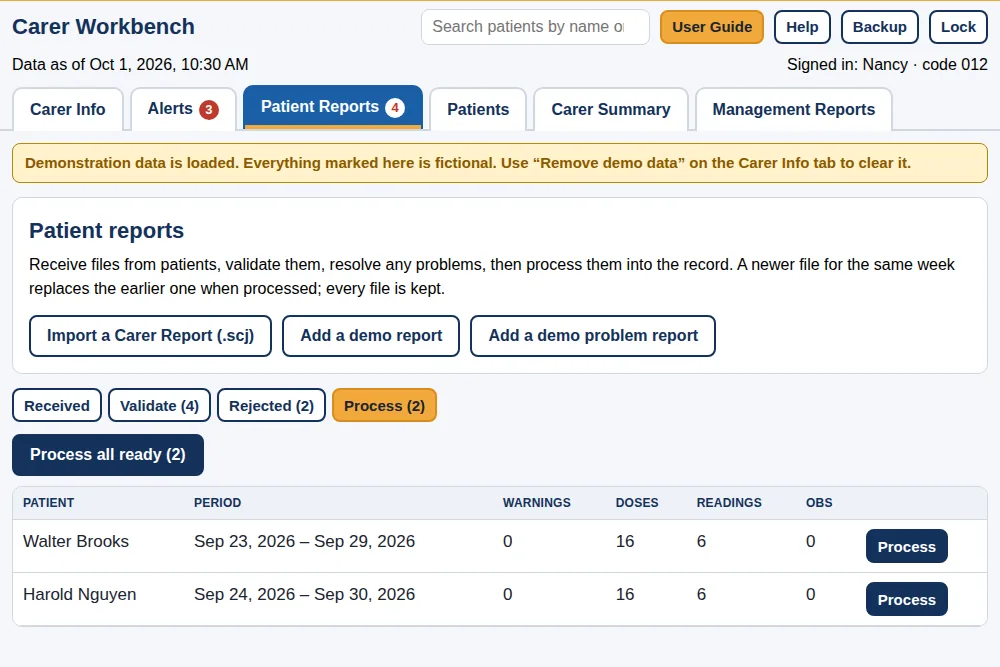
Save the attachment and import it. Validation checks it’s addressed to your carer code, matches someone on your register, and is complete. Each report becomes Ready, or Rejected with the reason and what to do.
You process it
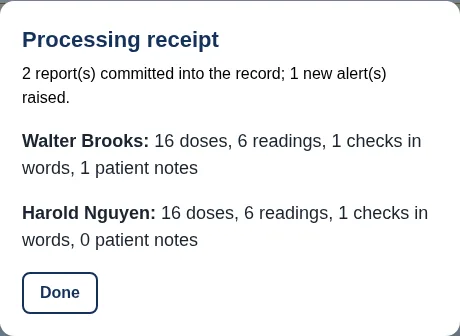
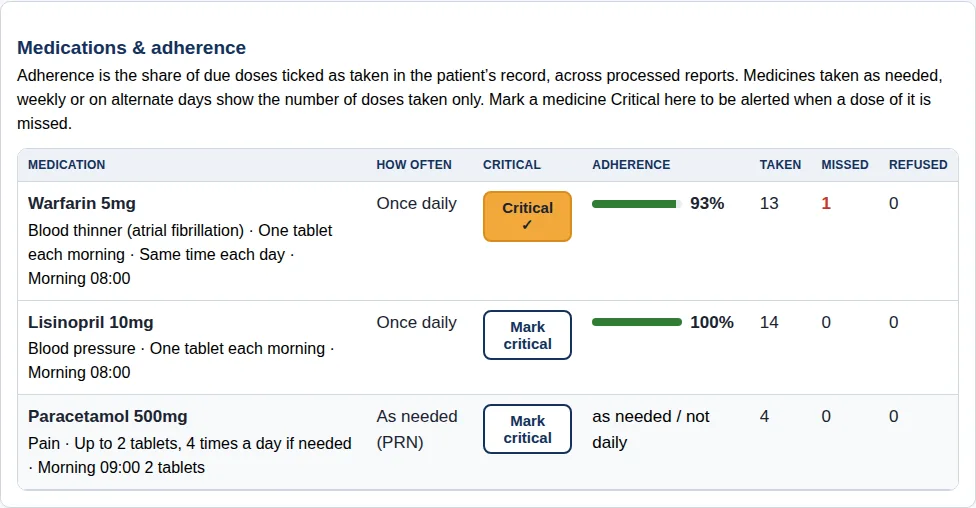
One press adds the week to their record: every dose taken or missed, every reading and every note. A receipt shows what went in and which alerts were raised.
You work the alerts
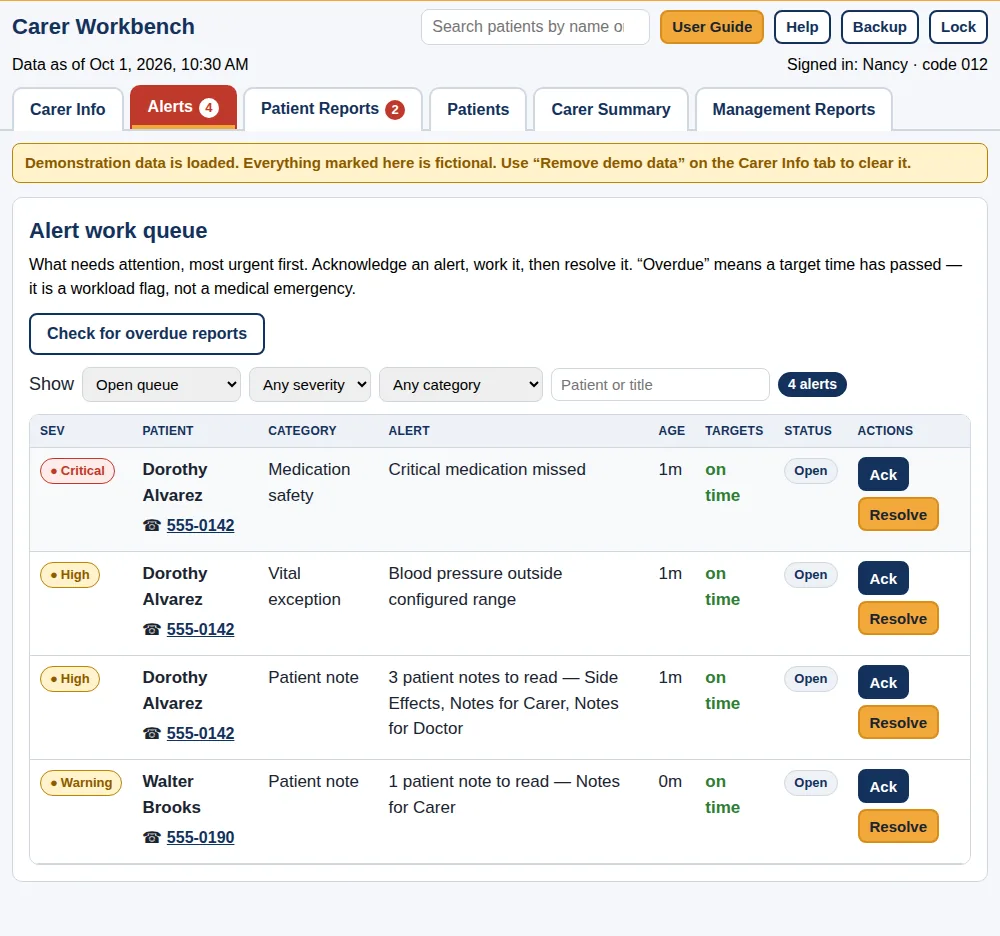
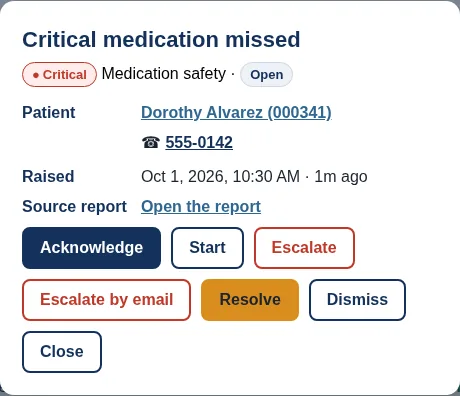
Acknowledge, follow up and resolve, most urgent first. The Carer Summary and Management Reports show where things stand.
What raises an alert
Critical medicine missed
A missed dose of a medicine you have marked Critical for that person.
Reading outside your range
A reading outside a normal range you set for that person, such as a blood pressure target their doctor gave. It means “outside the range you set”, not a diagnosis.
Notes to read
Notes they wrote that need your review: side effects, notes for you, notes for the doctor.
Overdue reports
When you press Check for overdue reports, anyone whose report hasn’t arrived is listed. The Workbench doesn’t check in the background or contact anyone for you.
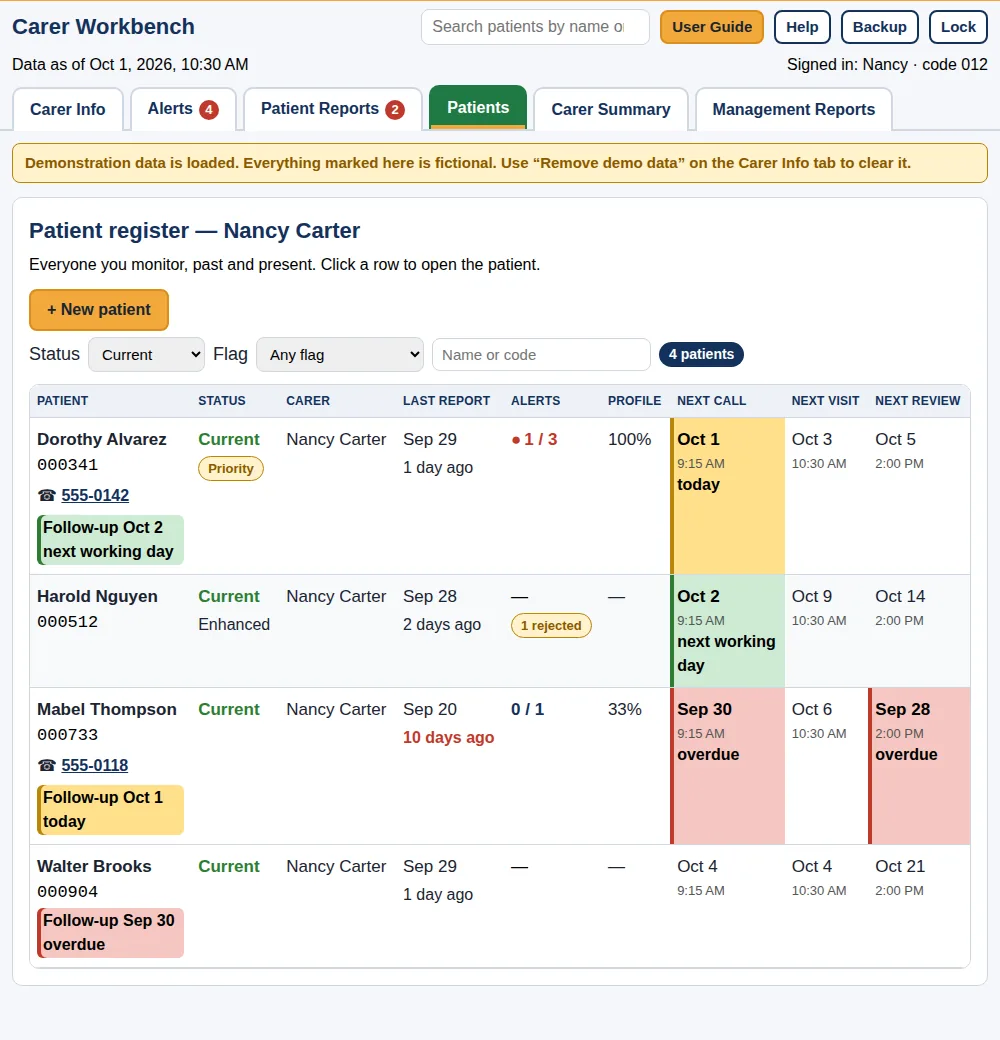
Everyone on one register
Each person’s status, last report, open alerts, follow-ups and the next call, visit and review dates, colour-coded when they’re due today or overdue.
The original is never lost
If you correct something, the Workbench records your reason and keeps the original report. If a newer report arrives for the same week, it takes over when processed, and the earlier files are kept.
Each person has their own page: medicines, readings, notes, your observations, follow-ups and the next call, visit and review dates.
Reports you can hand on
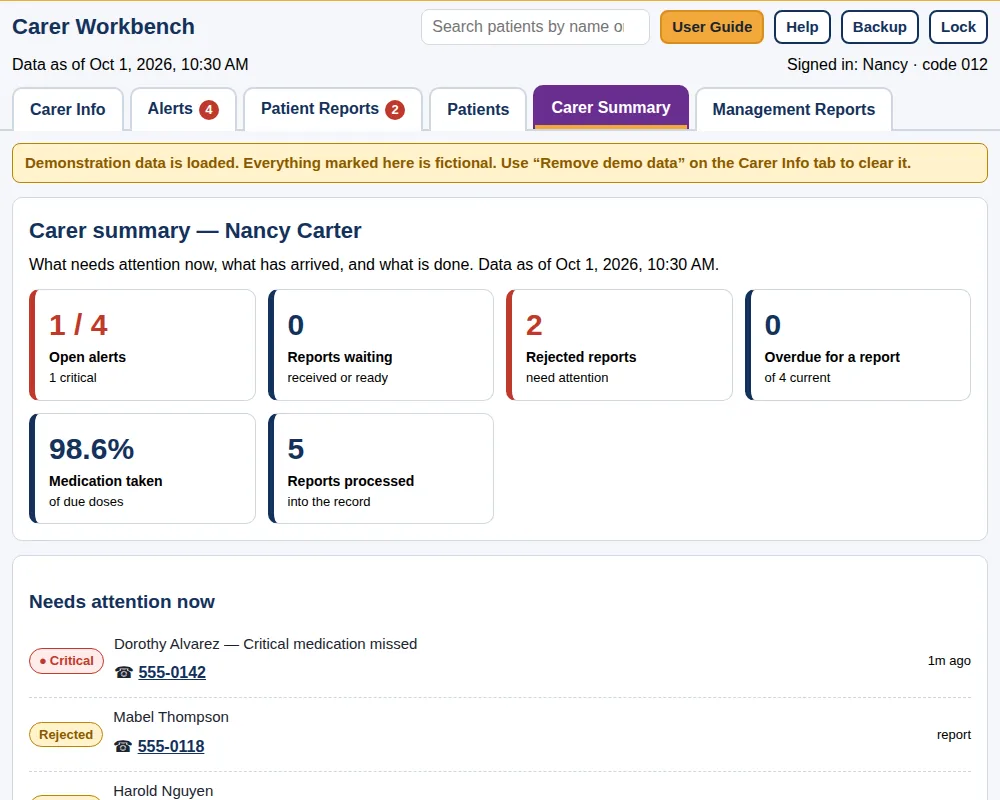
Carer Summary shows open alerts, reports waiting, rejected reports, people overdue for a report and the medication taken rate. Click a tile to go to that list.
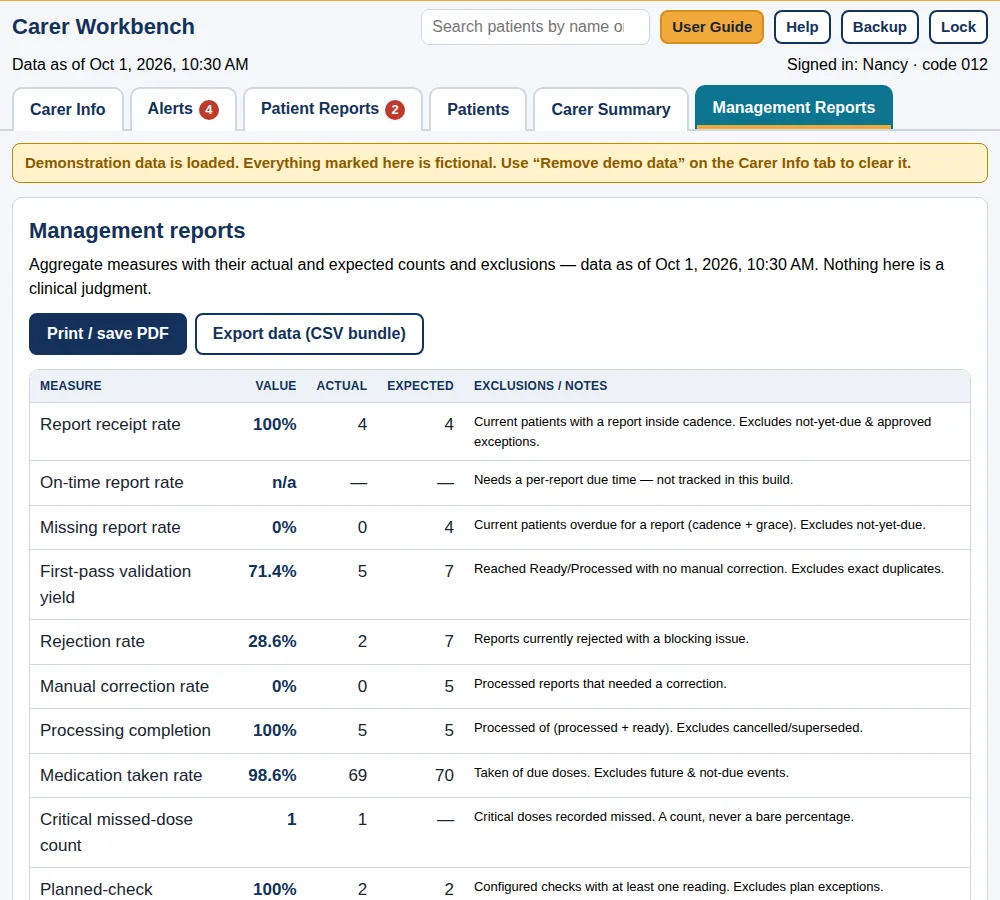
Management Reports show each measure with its actual and expected counts and what is excluded. Print or save as PDF, or export a CSV bundle for a spreadsheet.
Locked on your device
- Your own passkey phrase.
Everything in the Workbench on your device is locked with a phrase you choose. Nobody else can open it, including us.
- Backups you keep.
Backup saves an encrypted .cwb file to your Downloads folder. It is separate from each person’s report files.
- One device at a time.
The Workbench doesn’t sync. To move, use Send my records to another device, or restore a backup.
- Practise first.
Load demo data adds five fictional people with reports and alerts, clearly marked, so you can learn before your first real week.
No tracking, ever. The apps contain no analytics, advertising or tracking code, and no third-party software that could report what you type. We never receive your health information, so it can’t be lost, sold or shown to advertisers. We build every version to keep that promise.
Clear about what it is
It does
- Import, validate and process weekly Carer Reports from the Health Record
- Keep a register of the people you look after, with medicines, readings, notes and follow-ups
- Raise alerts from the rules and ranges you set, and keep how each was handled
- Print or save reports as PDF, and export a CSV bundle
- Keep originals, and record your reason for every correction
It does not
- Monitor anyone in real time, or detect emergencies
- Diagnose, interpret a reading, or recommend treatment
- Contact anyone for you. “Resubmit” records a request; an email escalation opens an email for you to send
- Replace a doctor, nurse, pharmacist or emergency services
- Sync between devices or give anyone else access
Free with every licence: 6 printable companions
Interactive checklists and guides to fill in on screen, save and print, sent with your Carer Workbench licence. Each comes in a standard and a dyslexia-friendly edition.
- Family Emergency Contact Tree. Every emergency contact in one place, ready to print and share with the family.
- Fall Prevention Checklist. Simple changes that lower the risk of a fall.
- Fall-Risk Self-Check. A quick check of the most common fall risks, at home and in your daily routine.
- ICE Wallet Card. An “in case of emergency” card to fill in, print and carry.
- First Aid Guide. Plain-English first steps for common emergencies at home.
- Emergency Kit Checklist. What to gather before an emergency, and what to do when one comes.
Try it free for 30 days
Then $3 a month or $14.95 a year. Licences never renew by themselves: the Workbench reminds you before yours ends.
- The Carer Workbench, standard and dyslexia-friendly editions
- A special carer version of the Health Record app
- The step-by-step User Guide and help pages
- 6 free printable companions, from a Family Emergency Contact Tree to an ICE Wallet Card
Prices in US dollars. Any tax is shown at checkout before you pay. Paid licences have the same 30-day money-back guarantee as our books: see our Refund Policy.
Questions people ask
What does the person I look after need?
Their own Health Record on their own device, your 3-digit carer code and their 6-digit patient code typed into it, and a passkey phrase they share with you in person or by phone.
How do I know a report is meant for me?
Validation checks the carer code it was addressed to and matches the person on your register. These codes route reports; they are not proof of identity, so agree them with each person face to face.
What is the carer version of the Health Record?
The Health Record Carer Edition, included with your Workbench licence. It is the full Health Record with carer tools: Prepare a copy for the patient to set up someone’s record and send it to them, and Restore to open the full record from a backup they send you. It holds one person’s record at a time in your browser, so Backup before you Restore another person’s file.
Does the person I care for see what I record?
No. Your notes, observations and follow-ups stay in your Workbench.
Will it tell me if someone is unwell?
No. It shows what was recorded and flags readings outside the ranges you set. It doesn’t diagnose, monitor or detect emergencies. If someone needs urgent help, call your local emergency number.
Can I use it on more than one computer?
One device at a time. Move it with Send my records to another device, or restore your latest backup.
What if I forget my workbench passkey phrase?
We can’t recover it, and nobody else can either. You can start a new workbench and restore a backup only if you know the phrase that locked it. Keep it somewhere safe.
The apps store what you type and print it the way you ask. They are not medical devices, not medical, legal or financial advice, and not a substitute for your doctor, pharmacist or care team. If someone needs urgent help, call your local emergency number.
See your week at a glance
Try the Carer Workbench free for 30 days, with demo data to practise on.